Every year, hundreds of workers suffer severe injuries or fatalities during equipment servicing—most preventable with a proper lockout tagout (LOTO) procedure. At the heart of that procedure? A well-designed lockout tagout form template.
This isn’t just paperwork. It’s a legal requirement under OSHA 29 CFR 1910.147 and a frontline defense against accidental energy release. Whether you manage a manufacturing line, a maintenance team, or a distribution center, a standardized LOTO form reduces confusion, holds people accountable, and documents compliance when it matters most.
But many companies still rely on handwritten notes, inconsistent checklists, or no form at all. That’s a risk—not just for safety, but for audits, insurance claims, and regulatory penalties.
Here’s how to build, use, and optimize a lockout tagout form that works in real-world conditions.
What Is a Lockout Tagout Form?
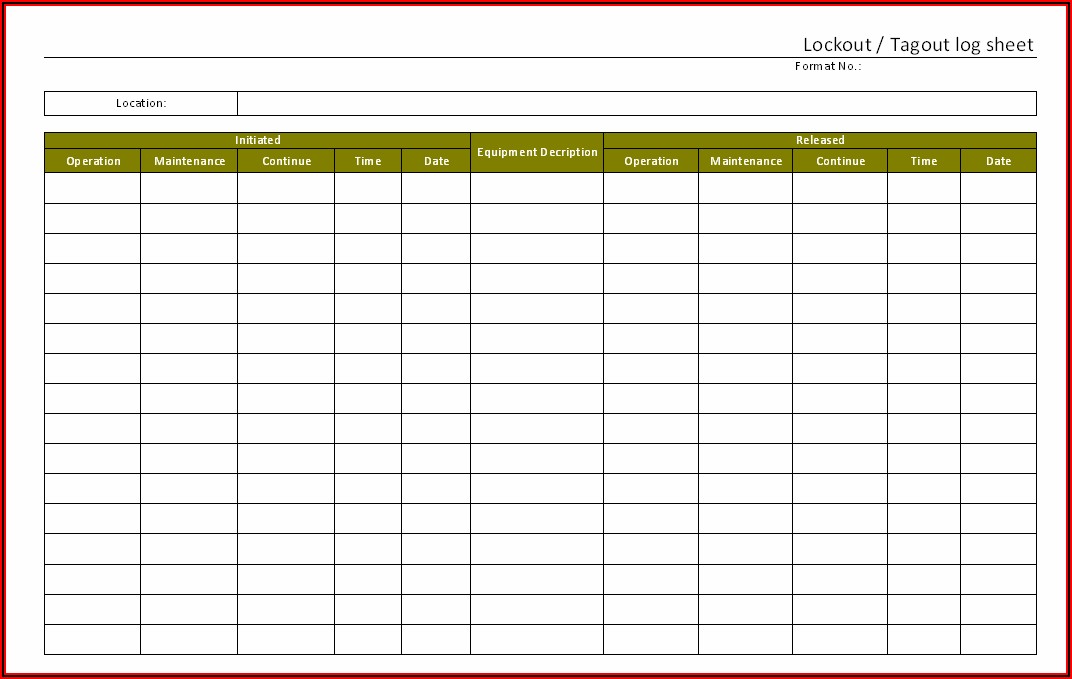
A lockout tagout form is a documented checklist used during maintenance or repair of machinery to ensure all energy sources are isolated and controlled. It records who initiated the lockout, what equipment is involved, which energy sources were disconnected, and when the process started and ended.
Think of it as a safety transcript. It doesn’t just guide the process—it proves it was followed.
Unlike generic safety forms, a LOTO form is tied directly to an energy control procedure (ECP). It’s filled out before work begins and remains active until every lock is removed and the machine is cleared for restart.
Key Components of an Effective LOTO Form Template
A useful lockout tagout form template isn’t a blank sheet with “LOTO” at the top. It’s structured to prevent errors and capture critical details. Here’s what must be included:
1. Equipment Identification
- Machine name
- Location (e.g., production line 3, Room B12)
- Asset or serial number
Example: “Hydraulic Press #HP-223, South Assembly Line”
2. Authorized Employee Information
- Name
- Employee ID
- Department
Only trained, authorized personnel should initiate lockout. This section verifies who they are.
3. Energy Sources Identified List every energy source:
- Electrical (voltage level)
- Pneumatic
- Hydraulic
- Thermal
- Gravitational
- Chemical
Real mistake: A technician locks out power but misses a pressurized air line—resulting in sudden movement. Documenting each source prevents this.
4. Lock and Tag Details
- Number of locks applied
- Lock IDs or colors
- Tag information (warning message, date, time)
Each lock should be personal—no master keys, no shared devices.
5. Procedure Steps Followed Checklist format of the shutdown process: ☐ Shut off power at control panel ☐ Close hydraulic valve ☐ Bleed residual pressure ☐ Apply lock and tag
This ensures no step is skipped.
6. Verification of Isolation A section for the worker to confirm:

- Zero energy state verified
- Test run conducted safely
- Equipment cannot be restarted
This is OSHA’s requirement for “verification”—not assumption.
7. Unlock and Restart Authorization
- Final clearance check
- Signature of lead technician
- Date and time of equipment restart
Only after this step can locks be removed.
When to Use a Lockout Tagout Form
Not every maintenance task needs a full LOTO form, but here’s when you absolutely must use one:
- Routine servicing of machinery (e.g., blade replacement on a shear)
- Repair work involving disassembly (e.g., motor replacement)
- Adjustments that require access to danger zones
- Cleaning internal components under energy risk
- Multiple workers on the same equipment
Even minor tasks become high-risk if energy isolation isn’t confirmed.
Use case: A maintenance tech clears a jam in a conveyor belt. Without LOTO, a coworker remotely restarts the system. The result: a crushed hand. A filled LOTO form would have blocked that restart.
Free Lockout Tagout Form Template (Downloadable Structure)
Below is a ready-to-use lockout tagout form template structure. Copy this into Word, Google Docs, or your safety management system.
LOCKOUT TAGOUT AUTHORIZATION FORM
Equipment: ___________________________ Location: ________________ Serial #: _____________________________ Date: ___________________
AUTHORIZED EMPLOYEE Name: ____________________ ID: ______ Dept: ___________
ENERGY SOURCES TO ISOLATE [ ] Electrical (______ V) [ ] Pneumatic [ ] Hydraulic [ ] Thermal [ ] Gravitational [ ] Chemical [ ] Other: ____________________
SHUTDOWN STEPS (Check as completed) [ ] Notified affected employees [ ] Shut down equipment using normal controls [ ] Isolated energy sources (valves closed, breakers off) [ ] Applied personal lock(s) and tag(s) [ ] Released stored energy (bled, blocked, discharged) [ ] Verified zero energy state
LOCKS APPLIED Lock ID: ______ Applied by: ___________ Lock ID: ______ Applied by: ___________
VERIFICATION I confirm the equipment is de-energized and safe for servicing. Signature: ___________________ Time: ________
RESTART CLEARANCE Work completed? [ ] Yes All tools removed? [ ] Yes Area clear? [ ] Yes Restart authorized by: _______________ Time: ________ Signature: ____________________________
Print this, laminate copies for the floor, or integrate into a digital safety app. Customize fields to match your equipment and workflow.
Common Mistakes That Render LOTO Forms Useless
A poorly used form is as dangerous as no form at all. Watch for these red flags:

- Blank or incomplete fields – Missing signatures or dates invalidate the process.
- One person fills out for a team – Each worker must apply their own lock and sign.
- Using tags without locks – Tags alone don’t physically prevent startup.
- No verification step – Assuming energy is off isn’t the same as testing it.
- Forms filed away, not posted – The form should be visible at the lockout point.
Real-world case: An OSHA audit cited a facility because LOTO forms showed “electrical isolation” but no verification step was signed. The inspector ruled it non-compliant—even though locks were used.
Digital vs. Paper LOTO Forms: What Works Best?
While paper forms are common, digital LOTO systems are gaining ground—especially in larger or regulated environments.
| Factor | Paper Forms | Digital Forms |
|---|---|---|
| Accessibility | On-site only | Cloud-based, mobile access |
| Audit trail | Manual filing, hard to track | Timestamped, auto-saved |
| Compliance proof | Physical storage needed | Exportable reports |
| Training integration | Separate | Can embed videos or prompts |
| Error prevention | Manual checks only | Required fields, alerts |
Best choice? For small teams: a well-managed paper system with binders at equipment stations. For larger operations: invest in digital. Apps like EHS Insight, Cority, or Limble CMMS offer built-in LOTO workflows.
5 Tools That Include LOTO Form Templates
If you want more than a PDF, consider platforms that embed LOTO into daily operations:
- EHS Insight
- - Includes customizable LOTO forms
- - Mobile app for on-the-floor use
- - Audit-ready reporting
- Procore (Safety Module)
- - Integrates LOTO with equipment logs
- - Real-time sync across teams
- - Great for construction and industrial sites
- Limble CMMS
- - Maintenance-focused with LOTO checklists
- - Assigns forms to work orders
- - Tracks lockout history per asset
- KNOW (by DuPont)
- - Behavioral safety platform with LOTO templates
- - Video prompts and training links
- - Ideal for high-turnover environments
- SafetyCulture (iAuditor)
- - Free LOTO templates in template library
- - Offline mobile use
- - Photo documentation support
These tools turn static forms into living safety documents.
How to Train Teams on Using LOTO Forms
A template is useless if people don’t use it right. Effective training includes:
- Hands-on drills: Simulate a lockout using the actual form
- Role-playing: One worker fills the form, another audits it
- Shadowing: New techs observe experienced ones completing LOTO
- Quarterly refreshers: Reinforce muscle memory
Include the form in your written energy control program. OSHA requires annual inspections—use that time to review form accuracy, not just procedure steps.
Make Your Lockout Tagout Form a Safety Standard
A lockout tagout form template isn’t a compliance box to check. It’s a critical control that protects lives. Whether you’re using paper or digital, the goal is the same: clear, consistent, and enforceable documentation.
Start with the template above. Customize it to your machines. Train your team to treat it like a permit-to-work—non-negotiable and fully completed. Audit it monthly.
When an inspector shows up, or worse, when an accident happens, that form becomes your strongest evidence: proof that safety wasn’t overlooked.
Use it. Enforce it. Improve it.
Frequently Asked Questions
What should a lockout tagout form include? It must list equipment details, authorized personnel, energy sources, isolation steps, verification of zero energy, and restart authorization.
Can I use a generic LOTO form for all machines? No. Each machine may have unique energy sources and shutdown steps. Customize the form or attach machine-specific procedures.
Who can fill out a LOTO form? Only authorized employees trained in energy control procedures.
Do I need a form if only one person is working? Yes. The form ensures all steps are followed, even for solo tasks.
Can digital signatures be used on LOTO forms? Yes, if the system ensures authenticity, timestamp, and accessibility for audits.
Should LOTO forms be kept on file? Yes. Retain them for at least one year for compliance and incident review.
Is a tagout form enough without a lock? Only in limited cases where a lock isn’t feasible—and only with a written justification and extra safety measures.
FAQ
What should you look for in Lockout Tagout Form Template: Free Download & Best Practices? Focus on relevance, practical value, and how well the solution matches real user intent.
Is Lockout Tagout Form Template: Free Download & Best Practices suitable for beginners? That depends on the workflow, but a clear step-by-step approach usually makes it easier to start.
How do you compare options around Lockout Tagout Form Template: Free Download & Best Practices? Compare features, trust signals, limitations, pricing, and ease of implementation.
What mistakes should you avoid? Avoid generic choices, weak validation, and decisions based only on marketing claims.
What is the next best step? Shortlist the most relevant options, validate them quickly, and refine from real-world results.